

When Does This Happen?
Whenever you have a line frame with no corresponding imported color frame, that frame needs to be analyzed. Analysis occurs when you:- Press the Analyze button on the current frame or selected frames
- Press the Colorize button (analysis is triggered automatically)
Cadmium saves a copy of your analyzed segment map, but if the line image is altered or analysis settings change, a new segmentation map will be needed.
Analysis Settings Panel
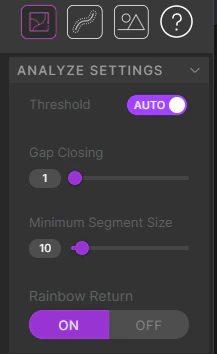
Threshold Settings
Threshold Settings
Determines how opaque a line image pixel needs to be to count as part of a segment boundary. Auto mode uses an algorithm to adjust brightness and contrast. Manual mode lets you set a thresholding alpha value between 0 and 255 — higher values include more semi-transparent pixels.
Gap Closing
Gap Closing
Like many animation programs, this determines the size of a gap between pixels to be considered closed. Uses an algorithm based on the Trapped Ball method.
Minimum Segment Size
Minimum Segment Size
The smallest number of pixels allowed in an individual segment. Any segment below this threshold is dissolved and combined with a neighboring segment. Useful for charcoal-like line quality that creates many small unintended segments.
Rainbow Return
Rainbow Return
On by default. When you press Analyze, each segment is colored a different random color. This helps quickly identify gaps in your artwork. Note that it replaces any existing color frames, so turn it off if you want to preserve them.