In order to work in Cadmium, you need to import frames. You can import to both the line layer and the color layer. It is usually recommended to first import your line images to the line layer.

File Type

  • Export your line frames from your animation software of choice. Make sure they are exported as PNG with alpha. Place your images in a unique folder and make sure the frames are numbered, starting with 1 (e.g. sharkdadLine_001.png).
  • Pro users: image sizes up to 4K UHD (7680 x 4320 pixels or equivalent aspect ratio). The free tier is limited to HD (1920 x 1080).

Importing Images to the Line Layer
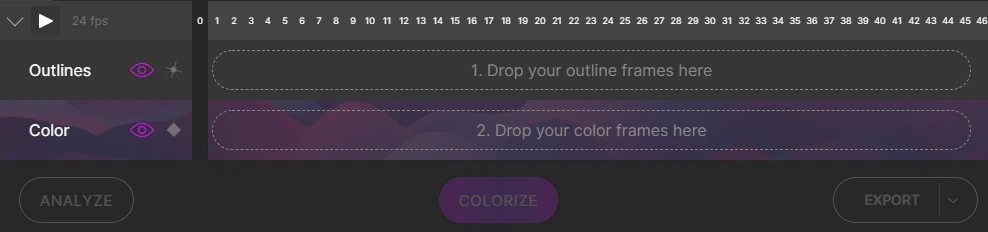
Importing to Line Layer
Most often, you’ll want to start by importing frames to your line layer. In the menu, click File > Import > Line Layer. Or you can simply select a folder with your images and drag it into the drop area on the timeline.

Importing Images to the Color Layer

Importing images to the Color Layer is primarily for providing a reference for how Cadmium should color your frames. Read more about Reference Frames. You can also import color images before line images. In this case, Cadmium will attempt to retroactively create a line image from your color frame. This is not commonly used, but some users find it helpful to manipulate colors or export each color separately from an already colored sequence.

Importing Images to the Reference Panel
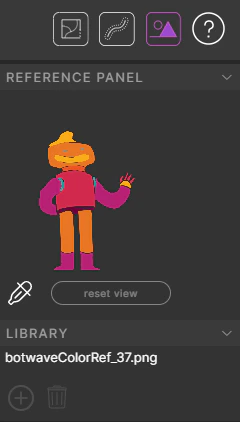
Reference Panel Import
Sometimes you might have style frames of your animation that are not within your sequence, but you want to reference the colors. You can import these into the Reference Panel, found in the top-right corner. In the Library dropdown, click the + sign to add a reference image. You can middle-mouse scroll to zoom in and out, or use the zoom tool. Resize the panel by hovering over its edges and dragging. The eyedropper tool works here as well.

Duplicate Frames

When you import a line or color image sequence that has multiple duplicates (common in cel animation for timing), Cadmium will recognize concurrent duplicate frames and “de-duplicate” them — extending the image as one selectable block. This preserves your animation timing while simplifying the coloring process. If your sequence has duplicate images that are not next to each other (like a looping cycle with repeated frames), Cadmium will recognize these as “clones.” Whatever you do to one frame will apply to all its clones. Selecting one of these frames will automatically select the others.