

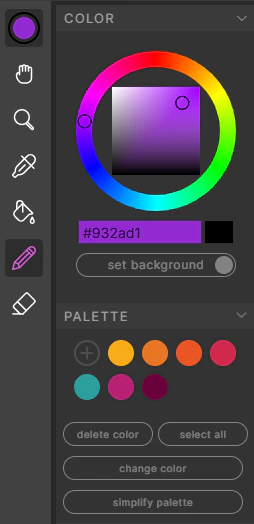
The Color Wheel
The Color Wheel can be interacted with to choose new colors, and there’s an input box for copy-pasting hex codes.- The large color block below the wheel displays the currently selected color.
- The small rectangle on the right is the secondary color — click it or press X to swap.
- Below this, you can set the canvas background color to the currently selected color.
The Color Palette
Any time a new color is introduced to your frames (via a reference image, or by selecting from the color wheel), a swatch appears in the Palette.- Click a swatch to select it
- Drag to reorder swatches
- Double-click to change the currently selected color to this swatch
- Change Color — select the swatch you want to change, pick a new color, and press the “Change Color” button to globally replace it
- Simplify Palette — finds near-neighboring colors and merges them into one
- Shift-click to select multiple swatches, or use the Select All button
- Delete Color removes any selected swatches